

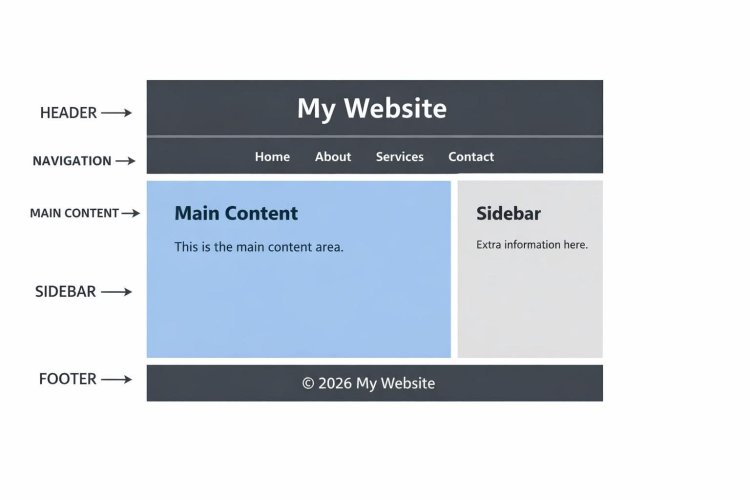
Creating a basic website layout means structuring the main sections of a webpage like a header, navigation menu, main content, sidebar, and footer. The simplest way is using HTML for structure and CSS for styling.

 Basic Website Layout Structure
A typical layout looks like this:
Header – Website title/logo
Navigation – Menu links
Main Content – Main information
Sidebar – Extra content or links
Footer – Copyright or contact info
 Simple HTML Layout Example
Code:
<!DOCTYPE html>
<html>
<head>
<title>My Website</title>
<link rel="stylesheet" href="style.css">
</head>
<body>
<header>
<h1>My Website</h1>
</header>
<nav>
<a href="#">Home</a>
<a href="#">About</a>
<a href="#">Services</a>
<a href="#">Contact</a>
</nav>
<div class="container">
<main>
<h2>Main Content</h2>
<p>This is the main content area.</p>
</main>
<aside>
<h3>Sidebar</h3>
<p>Extra information here.</p>
</aside>
</div>
<footer>
<p>© 2026 My Website</p>
</footer>
</body>
</html> Basic CSS for Layout
Code:
body{
  font-family: Arial;
  margin:0;
}

header{
  background:#333;
  color:white;
  text-align:center;
  padding:20px;
}

nav{
  background:#555;
  padding:10px;
  text-align:center;
}

nav a{
  color:white;
  margin:10px;
  text-decoration:none;
}

.container{
  display:flex;
  padding:20px;
}

main{
  flex:3;
  padding:20px;
}

aside{
  flex:1;
  background:#f4f4f4;
  padding:20px;
}

footer{
  background:#333;
  color:white;
  text-align:center;
  padding:10px;
}
Last edited: