You are using an out of date browser. It may not display this or other websites correctly.
You should upgrade or use an alternative browser.
You should upgrade or use an alternative browser.
Master in MS Excel - Formula and shortcuts etc
- Thread starter Rizwan
- Start date



 Quick Tip: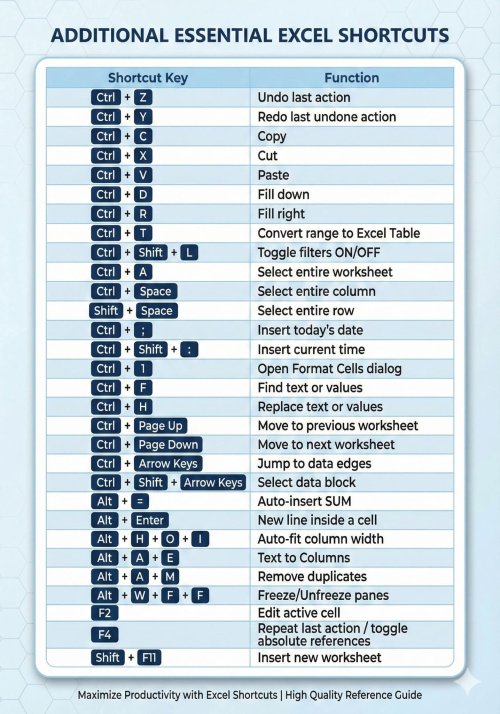





EXCEL TABLE SHORTCUTS (SAVE THIS)
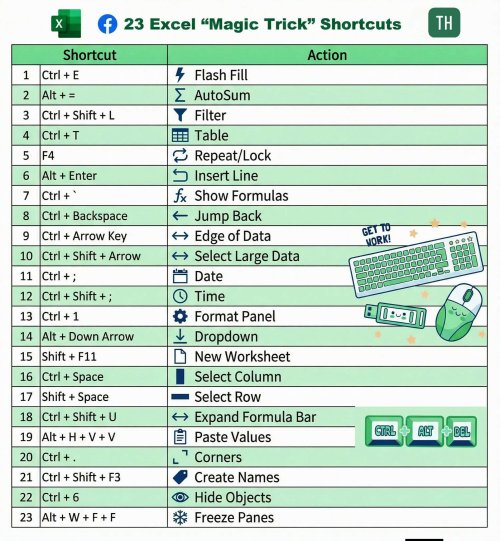
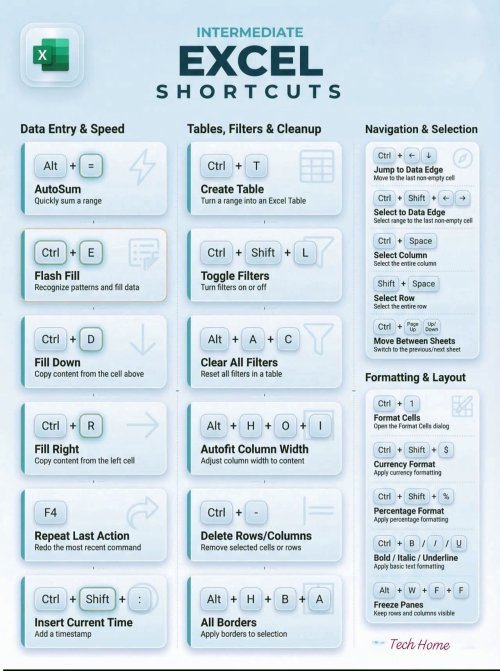
 Ctrl+T – Convert range into an Excel Table
Ctrl+Shift+L – Toggle filters in table
Tab – Move to next cell in table
Shift+Tab – Move to previous cell
Ctrl+ArrowKeys – Jump to table edges
Ctrl+Shift+ArrowKeys – Select table data
Alt+DownArrow – Open table filter dropdown
Ctrl+Space – Select entire table column
Shift+Space – Select entire table row
Ctrl+Shift+Plus – Insert new table row
Ctrl+Minus – Delete selected table row
Ctrl+; – Insert current date in table
Ctrl+Shift+: – Insert current time in table
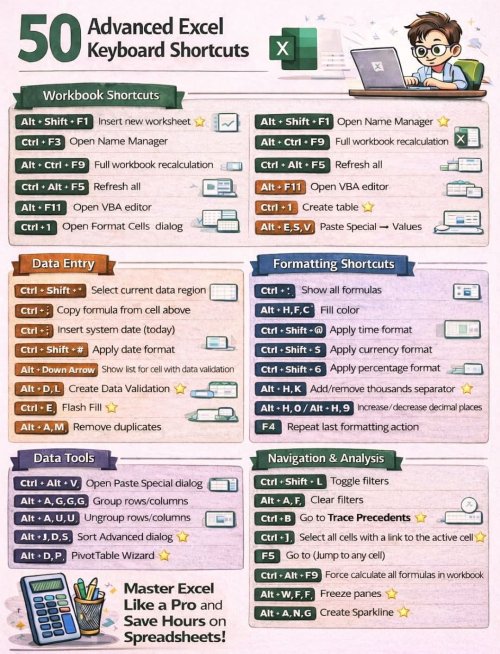
Ctrl+Alt+V – Paste special inside table
F4 – Repeat last table action
#excel #pctipsandtricks #excel #excelkeyboardshortcuts #usa
Ctrl+T – Convert range into an Excel TableCtrl+Shift+L – Toggle filters in tableTab – Move to next cell in tableShift+Tab – Move to previous cellCtrl+ArrowKeys – Jump to table edgesCtrl+Shift+ArrowKeys – Select table dataAlt+DownArrow – Open table filter dropdownCtrl+Space – Select entire table columnShift+Space – Select entire table rowCtrl+Shift+Plus – Insert new table rowCtrl+Minus – Delete selected table rowCtrl+; – Insert current date in tableCtrl+Shift+: – Insert current time in tableCtrl+Alt+V – Paste special inside tableF4 – Repeat last table action#excel #pctipsandtricks #excel #excelkeyboardshortcuts #usa
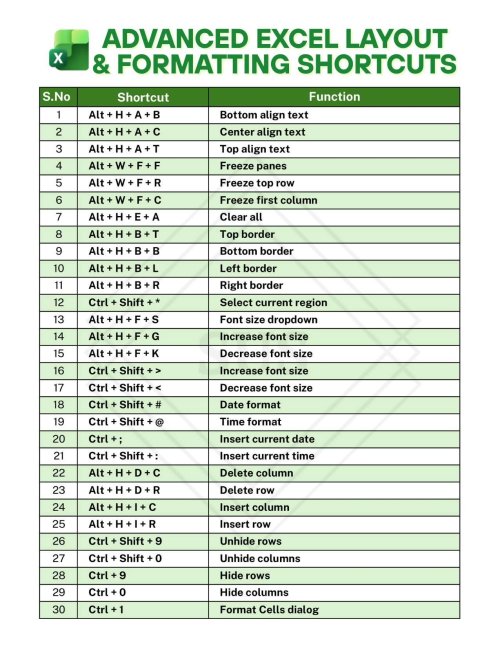
✦ Alt + H + O + I → Auto fit column width
✦ Alt + H + D + C → Delete column
✦ Alt + H + D + R → Delete row
✦ Alt + N + V → Create PivotTable
✦ Alt + N + F + S → Insert SmartArt
✦ Alt + F1 → Create chart in the same sheet
✦ Shift + Space → Select entire row
✦ Ctrl + Space → Select entire column
✦ Ctrl + ; → Insert current date
✦ Alt + H + O + R → Rename worksheet
✦ Alt + H + M + C → Merge and center
✦ Alt + H + B + N → Remove all borders
✦ Alt + A + T → Open the Sort dialog box
✦ Alt + W + F + F → Freeze or unfreeze
✦ Ctrl + Shift + "+" → Insert new row or column
✦ Ctrl + "-" → Delete selected row or column
✦ Ctrl + Shift + "~" → Apply general number format
✦ Ctrl + Shift + @ → Apply time format
✦ Ctrl + Shift + ^ → Apply exponential format
✦ Ctrl + Shift + & → Apply outline border
✦ Ctrl + Shift + _ → Remove outline border
✦ Ctrl + 8 → Show or hide outline symbols
✦ Ctrl + Alt + F9 → Recalculate all formulas
✦ Ctrl + Shift + O → Select cells with comments
✦ Ctrl + Z → Undo last action
✦ Ctrl + Y → Redo last undone action
✦ Ctrl + Q → Quick Analysis tool
✦ Ctrl + Shift + L → Add or remove filters
✦ Ctrl + Shift + U → Expand or collapse formula bar
✦ Ctrl + Shift + Arrow Keys → Select entire data range.
✦ Ctrl + S → Save workbook instantly
✦ Ctrl + N → Create new workbook
✦ Ctrl + O → Open existing workbook
✦ Ctrl + P → Print current sheet
✦ Ctrl + F → Find text or numbers
✦ Ctrl + H → Find and replace
✦ Ctrl + A → Select all data
✦ Ctrl + C → Copy selected cells
✦ Ctrl + V → Paste copied data
✦ Ctrl + X → Cut selected cells
✦ F2 → Edit active cell
✦ F4 → Repeat last action / lock cell reference ($)
✦ F7 → Spell check
✦ F11 → Create chart in new sheet
✦ F12 → Save As dialog box
✦ Ctrl + Page Up → Move to previous worksheet
✦ Ctrl + Page Down → Move to next worksheet
✦ Ctrl + Tab → Switch between open workbooks
✦ Ctrl + 1 → Open Format Cells dialog box
✦ Ctrl + Shift + $ → Apply currency format
✦ Ctrl + Shift + % → Apply percentage format
✦ Ctrl + Shift + # → Apply date format
✦ Alt + = → AutoSum formula
✦ Ctrl + D → Fill down
✦ Ctrl + R → Fill right
✦ Ctrl + Enter → Fill selected cells with same value
#Shortcuts #Excel
✦ Alt + H + D + C → Delete column
✦ Alt + H + D + R → Delete row
✦ Alt + N + V → Create PivotTable
✦ Alt + N + F + S → Insert SmartArt
✦ Alt + F1 → Create chart in the same sheet
✦ Shift + Space → Select entire row
✦ Ctrl + Space → Select entire column
✦ Ctrl + ; → Insert current date
✦ Alt + H + O + R → Rename worksheet
✦ Alt + H + M + C → Merge and center
✦ Alt + H + B + N → Remove all borders
✦ Alt + A + T → Open the Sort dialog box
✦ Alt + W + F + F → Freeze or unfreeze
✦ Ctrl + Shift + "+" → Insert new row or column
✦ Ctrl + "-" → Delete selected row or column
✦ Ctrl + Shift + "~" → Apply general number format
✦ Ctrl + Shift + @ → Apply time format
✦ Ctrl + Shift + ^ → Apply exponential format
✦ Ctrl + Shift + & → Apply outline border
✦ Ctrl + Shift + _ → Remove outline border
✦ Ctrl + 8 → Show or hide outline symbols
✦ Ctrl + Alt + F9 → Recalculate all formulas
✦ Ctrl + Shift + O → Select cells with comments
✦ Ctrl + Z → Undo last action
✦ Ctrl + Y → Redo last undone action
✦ Ctrl + Q → Quick Analysis tool
✦ Ctrl + Shift + L → Add or remove filters
✦ Ctrl + Shift + U → Expand or collapse formula bar
✦ Ctrl + Shift + Arrow Keys → Select entire data range.
✦ Ctrl + S → Save workbook instantly
✦ Ctrl + N → Create new workbook
✦ Ctrl + O → Open existing workbook
✦ Ctrl + P → Print current sheet
✦ Ctrl + F → Find text or numbers
✦ Ctrl + H → Find and replace
✦ Ctrl + A → Select all data
✦ Ctrl + C → Copy selected cells
✦ Ctrl + V → Paste copied data
✦ Ctrl + X → Cut selected cells
✦ F2 → Edit active cell
✦ F4 → Repeat last action / lock cell reference ($)
✦ F7 → Spell check
✦ F11 → Create chart in new sheet
✦ F12 → Save As dialog box
✦ Ctrl + Page Up → Move to previous worksheet
✦ Ctrl + Page Down → Move to next worksheet
✦ Ctrl + Tab → Switch between open workbooks
✦ Ctrl + 1 → Open Format Cells dialog box
✦ Ctrl + Shift + $ → Apply currency format
✦ Ctrl + Shift + % → Apply percentage format
✦ Ctrl + Shift + # → Apply date format
✦ Alt + = → AutoSum formula
✦ Ctrl + D → Fill down
✦ Ctrl + R → Fill right
✦ Ctrl + Enter → Fill selected cells with same value
#Shortcuts #Excel
 Alt + H + M + M - Merge across Alt + H + M + A - Merge cells and center Alt + H + M + S - Merge selected cells Alt + H + F + C + N - Apply navy font color Alt + H + H + N - Apply navy fill color Alt + A + F + M + M - Filter by minute Alt + H + B + A + A - Apply all borders Alt + H + V + S + F - Paste special with formulas Alt + H + L + W - Apply contains-error conditional formatting Alt + H + O + W + A - Set all columns to same width Alt + H + O + E + A - Set all rows to same height Alt + H + F + T + A - Apply angled text orientation Alt + H + I + S + C - Insert chart sparkline Alt + H + D + S + C - Delete chart sparkline Alt + A + F + T + S - Sort by text length Alt + H + F + C + E - Apply emerald font color Alt + H + H + E - Apply emerald fill color Alt + H + V + S + C - Paste special with comments Alt + H + O + P + A - Protect all sheets Alt + H + O + U + A - Unprotect all sheets Alt + H + B + N + N - Remove all borders (alternative) Alt + H + F + S + T - Apply title case font style Alt + A + F + C + C - Clear color filters Alt + H + I + W + S - Insert worksheet at end Alt + H + F + C + S - Apply silver font color Alt + H + H + S - Apply silver fill color Alt + H + V + S + N - Paste special with no borders Alt + H + F + T + U - Apply upward text orientation Alt + H + F + T + D - Apply downward text orientation Alt + A + F + S + T - Sort by text case
Merge Across Tip: Use Alt + H + M + M to merge cells across a row selection, creating clean headers for your data tables!
#ExcelShortcuts
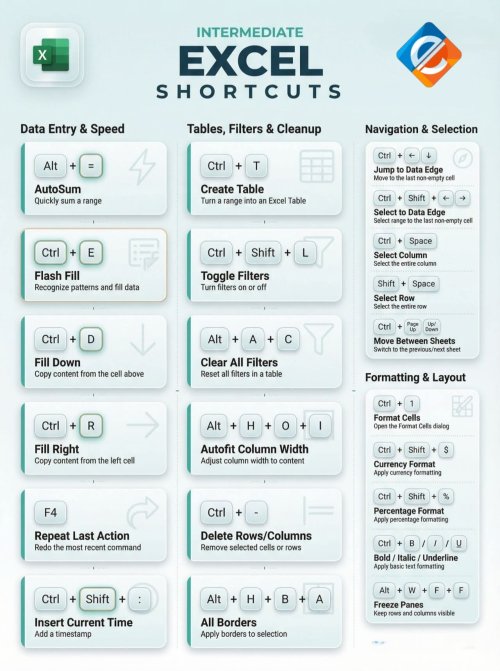 Ctrl + 9 → Hide selected rows Ctrl + 0 → Hide selected columns Ctrl + Shift + 9 → Unhide rows Ctrl + Shift + 0 → Unhide columns Ctrl + E → Flash Fill Ctrl + N → New workbook Alt + = → AutoSum Ctrl + ; → Insert current date (static) Ctrl + Shift + ; → Insert current time (static) Ctrl + 1 → Open Format Cells dialog Ctrl + T → Create table Ctrl + Space → Select entire column Shift + Space → Select entire row Ctrl + Arrow Keys → Navigate to data region edge Ctrl + Shift + L → Toggle filters Alt + N + V → Insert PivotTable Alt + A + M → Remove duplicates F2 → Edit active cell F4 → Repeat last action / toggle absolute references Ctrl + Z → Undo Ctrl + Y → Redo Ctrl + C → Copy Ctrl + X → Cut Ctrl + V → Paste Ctrl + F → Find Ctrl + H → Replace Ctrl + A → Select current region (press twice for entire worksheet) Ctrl + S → Save workbook Ctrl + O → Open workbook Ctrl + P → Print
Quick Tip: Select rows and press Ctrl + 9 to hide them, then Ctrl + Shift + 9 to reveal. The same logic applies to columns using Ctrl + 0 and Ctrl + Shift + 0.
#excelshortcuts